Warbird Information Exchange

DISCLAIMER: The views expressed on this site are the responsibility of the poster and do not reflect the views of the management.
It is currently Tue Apr 07, 2026 4:18 pm

All times are UTC - 5 hours


Classic Wings Magazine WWII Naval Aviation Research Pacific Luftwaffe Resource Center
When Hollywood Ruled The Skies - Volumes 1 through 4 by Bruce Oriss


Post new topic Reply to topic  [ 14 posts ] 
Author Message
PostPosted: Wed Apr 04, 2007 5:01 pm 
Offline
User avatar

Joined: Wed Oct 04, 2006 6:42 pm
Posts: 627
Location: Akron, Ohio
Well, given the many "photography-savy" memebers on here, I was hoping to learn a few things. Now, keep in mind, I am not trying to be a "professional" photographer. I am a college and don't have a super expensive camera, I'm just looking to take pictures that look good as desktops and screensavers and an occasional print. After college I hope to get a better camera and take the same quality pictures that I see posted by many of you. Below I have posted a couple pictures and are not all that great and then some that I consider good enough for right now.

I'm just wondering as to any filters (polarizing), camera settings, or shooting techniques that you guys use when shooting flying aircraft.
Thanks in advance! :D

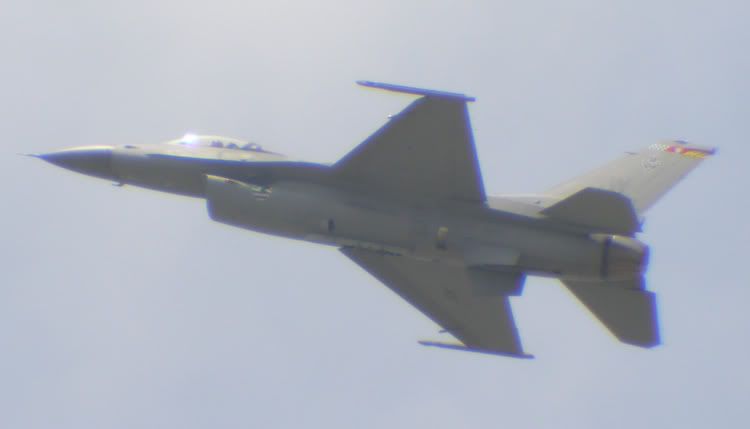
Pretty blurry... is it because of sun blur or motion blur?
Image

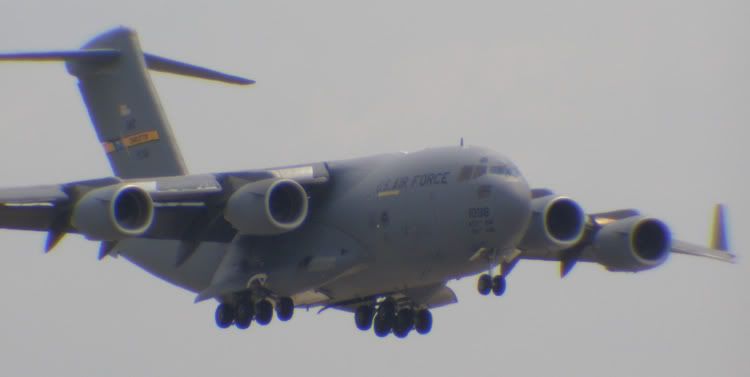
Blurry as well, but it is landing, it can't really be motion blur can it? Is it more sun?
Image

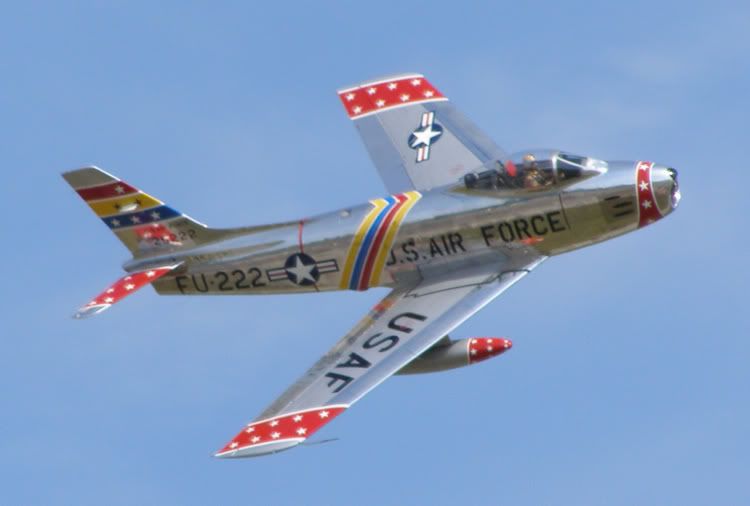
This one is blown up a bit but it is not too bad, but a bit blurry... I'm guessing from motion? It was a high speed pass.
Image

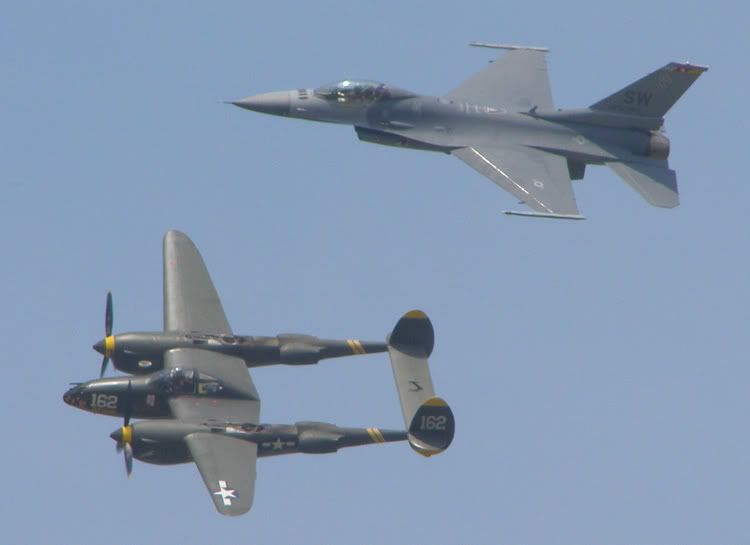
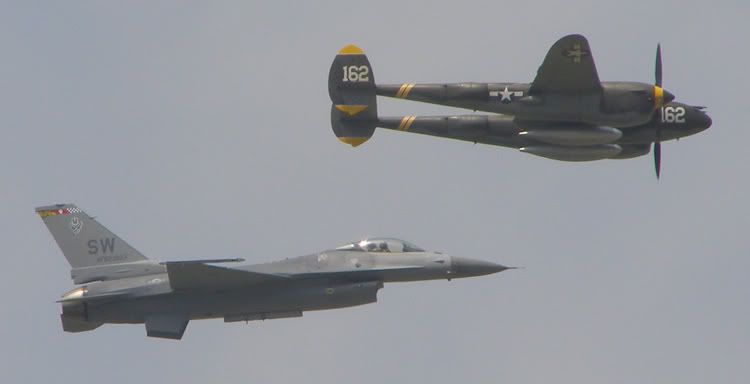
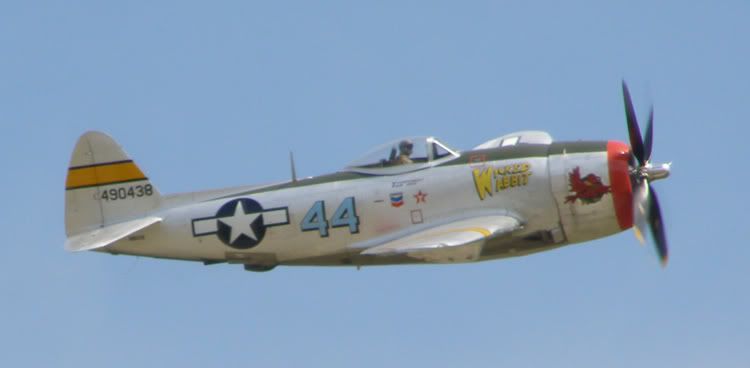
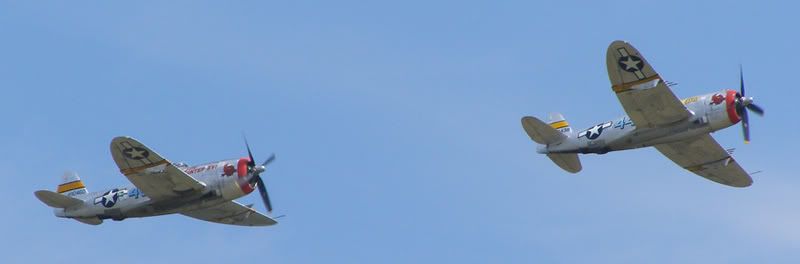
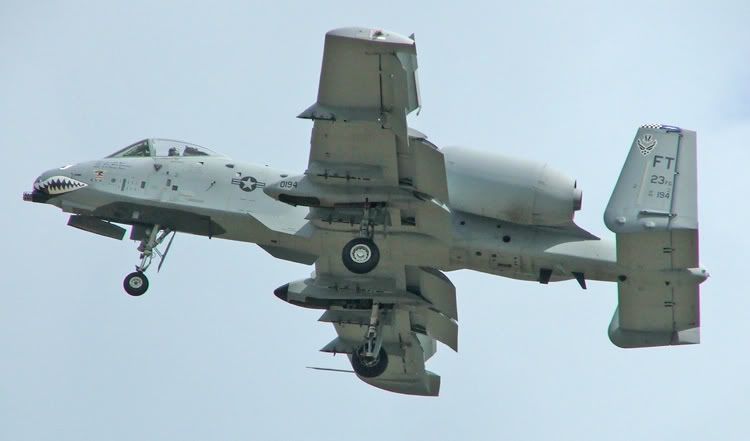
For my digital use the next pictures are not bad at all. There is some blur but it is not as evident on screensavers. I'm not sure if I can improve the quality or that will come with a more expensive camera.
Image
Image
Image
Image
Image


Top
 Profile  
 
 Post subject:
PostPosted: Wed Apr 04, 2007 5:07 pm 
Offline
User avatar

Joined: Thu Feb 22, 2007 4:15 pm
Posts: 789
Location: CAF SoCal Wing Camarillo, CA
You will find this interesting. Eric is a very good friend of mine and a great photog.

Dan


http://www.vg-photo.com/index.html

_________________
Check out our new website.
CAF SoCal Wing http://www.cafsocal.com/


Image


Top
 Profile  
 
 Post subject:
PostPosted: Wed Apr 04, 2007 5:44 pm 
Offline
Been here a long time

Joined: Sun May 02, 2004 1:16 am
Posts: 11332
With jets, you can't tell if you were shooting at 1/60th of a second or 1/1000th of a second. Go with the fastest shutter speed consistent with a good exposure.

I also use full manual settings on my camera otherwise the exposure typically gets set for the sky rather than the plane and the prop blur may or may not show up. I usually fix the shutter speed at 1/320th to 1/500th of a second for in-flight shots, then I take a reading from the horizon in the direction I'm shooting (preferably a similar color or another plane on the ground) and set the aperture.

You have to pan as best you can and take lots of photos and hope you get a good one. Even with an image stabilized lens, there is no guarantee- the lens can only compensate so much. Luckily with digital memory is cheap and you can take 1000 photos at a show and not burn up the checkbook.

I'm just an amateur, but on occasion I do get something good. These techniques helped me a bunch.


Last edited by bdk on Wed Apr 04, 2007 5:52 pm, edited 1 time in total.

Top
 Profile  
 
 Post subject:
PostPosted: Wed Apr 04, 2007 5:50 pm 
Offline
User avatar

Joined: Mon Mar 26, 2007 4:07 pm
Posts: 623
Location: Moorpark, CA
The top shot looks like is may be a problem with humidity. Even though it may look clear through the viewfinder, what makes its way to the sensor is sometimes slightly blurred by humidity, sunlight dirty sensor, lens, etc. You do have a couple of good ones there.

For shooting jets, I typically use 1/1000th of a sec exposure as you don't have anything on the aircraft moving that will be stop action. With prop aircraft, you want to back that down to get "prop blur", which gives a sense of motion to the propeller. Some prefer a stopped blade, but that kind of gives it a model look. There is a balance with the shutter speed being slower. Depending on the lens and the f-stop, you may get overexposure on slower shutter speeds.

I am currently working on articles on my website for shooting techniques. I have only published shooting static aircraft as yet. I have plans for techniques for taxiing aircraft, ground to air shots and air to air shots.

A lot depends on how much control that you have on the settings of your camera. I like shutter priority, shooting at ISO 200 (typically, brighter days may need higher). I know a lot of guys prefer aperture priority, but I have had mixed luck shooting aperture priority.

If you have other questions, you can send me a PM or an e-mail.

Eric


Top
 Profile  
 
 Post subject:
PostPosted: Wed Apr 04, 2007 5:53 pm 
Offline
3000+ Post Club
3000+ Post Club
User avatar

Joined: Thu Apr 27, 2006 2:10 pm
Posts: 3257
Location: New York
First off, there's no such thing as sun blur. Blur is caused by one of 3 things, (1) motion (2) out of focus (3) unsharp lens.

The first two pictures have strange color fringing (blue/purple edges) and I notice this is mostly at the edges of the pictures. This makes me suspect unsharp lens. By any chance are you using one of those screw-on teleconverters? They can sometimes produce effects like that. The F-16 may also have some motion blur but the center of the C-17 is actually reasonably sharp, it's just at the edges that it goes to heck.

With the others, the problem could be focus or motion blur or both. The way to tell is, if you look at the pictures at full resolution, blur due to motion (either subject motion or camera shake) will be directional, i.e., it will be more severe along horizontal edges than vertical edges, or sometimes it is diagonal -- whatever direction the camera moved relative to the subject. If all edges are equally soft, it's probably focus blur. That looks like the problem with the Sabre and the first P-47 pic. Maybe your AF system had trouble tracking the subject. Based on the degree of prop blur in the P-47 pic, you seem to be using a high enough shutter speed that unless you are quite bad at panning, focus may be the more likely problem.

The Heritage Flight pics are reasonably sharp, especially the second one. I do still see a little color fringing though -- note that the P-38 wing is edged with blue on the left, red on the right -- which suggests lens quality issues. Don't see any blur problem with the final two pics either. That also suggests a focus issue with your softer pics -- sometimes the AF is locking on, sometimes it isn't.

Could be more help with more info on your equipment and settings.

August


Top
 Profile  
 
 Post subject:
PostPosted: Wed Apr 04, 2007 6:11 pm 
Offline
1000+ Posts!
1000+ Posts!
User avatar

Joined: Sun Dec 03, 2006 7:43 pm
Posts: 1454
Location: Colorado
PhantomAce08

It looks like you have a couple of issues going on. 1. Purple Fringing 2. Blurring or Softness.

1.Purple Fringing is the purple chromatic aberration that you notice especially in the first couple of shots. It is the purple band on the border of the high contrast area between the aircraft and the sky. There are many causes of this, some have more to do with the lens and sensor of the camera however there are many ways to help control the purple fringing and since your camera seems to be capable of some manual settings you probably can help reduce this.

One factor that has been known to contribute to purple fringing is having a rather large wide aperture. In this photo your aperture is f4.5 well within the "danger zone" or purple fringing. If possible when shooting in a high contrast situation (dark plane against bright sky) see if you can keep your aperture smaller than f5 (lower number wider the aperture).

You can do this a couple of ways. If your camera has aperture priority mode you can set your aperture to a certain number. Although this would work it might give you undesired underexposure or shutter speeds that are too slow to catch the action. Another solution is to increase your ISO a bit. I noticed that this was taken at ISO 80. While as a general rule with digital it is nice to use the lowest ISO you can to reduce noise it may be worth while to manually set the ISO to 100 or even 200 to keep your aperture narrow and your shutter speeds up. Go up to 400 and you will probably start to see some noticeable noise. One nice thing is about noise is that it is easy to fix with software were as exposure or blur issues are a little more difficult in my experience. It is also fair to take maybe a stop or 2 away from your shutter speed and give it to your aperture because 1/500th should be fast enough for most applications.

2. Blurring and softness can be caused by a lot of factors that can't be changed including the lenses, sensor, image processor and image stabilization however there are many things you can do to to get crisper pictures.

Going back to the aperture. Usually the wider the aperture the softer the picture. Get the aperture stopped down a bit and you will get pictures that are a little more crisp. Again you can use the ISO might be the easiest way to do this. Another thing is that your camera has 10x zoom but no image stabilization. This can be an issue because when you zoom in 10x every movement and vibration your body makes is being amplified hundreds of times over the distance between you and the subject. You can try and pull back your zoom a tad bit to keep the movement down. The movement will cause you blurry and soft images. your camera is 10MP which gives you a little bit of leeway in cropping so if you don't zoom quite as deep you can still crop the photo tighter and still get a decent resolution print. If you notice the 2 P-47s are much more crisp than the top F-16 and not much purple fringe. The 2 P-47s are a slightly smaller aperture and a significantly less focal length which I think has made for more crisp and clear picture.

Also, use a monopod or tripod if you can for the big zoom shots because this will keep your camera more stable and hence more crisp pictures.

Anyways, I am no pro but it is a little bit of a hobby and these are some ideas of things to try until you get a process out that works for you and your camera. Luckily your Olympus has some ability to do some manual settings which can help you work around many issues.

I really like the shot of the A-10, not a thing wrong with that one in my opinion. The nice thing about digital is you can try lots of things out, take thousands of pictures a day and get instant results to play without it costing you much $. When I first got my first digital camera, a Sony DSC-S85 I took 5000 pictures in no time and sometimes 10 or 20 of the exact same picture just to try out all of the settings lol.

Happy Shooting,
Ryan


Top
 Profile  
 
 Post subject:
PostPosted: Wed Apr 04, 2007 10:10 pm 
Offline
3000+ Post Club
3000+ Post Club
User avatar

Joined: Thu Apr 27, 2006 2:10 pm
Posts: 3257
Location: New York
rwdfresno wrote:
Another thing is that your camera has 10x zoom but no image stabilization. This can be an issue because when you zoom in 10x every movement and vibration your body makes is being amplified hundreds of times over the distance between you and the subject. You can try and pull back your zoom a tad bit to keep the movement down. The movement will cause you blurry and soft images. your camera is 10MP which gives you a little bit of leeway in cropping so if you don't zoom quite as deep you can still crop the photo tighter and still get a decent resolution print.


I think everything Ryan said is true and excellent except for this little bit. Zooming out (optically) and then cropping tighter (equals zooming in digitally, if producing final image of same size) will not give you any less motion blur. The amount of blur relative to the size of the airplane will be the same at all focal lengths; it will be less noticeable if the airplane is smaller in the frame, but if you enlarge and crop so the airplane is the same size in the final picture, that magnification will amplify the blur as much as using a longer focal length would have.

His advice about managing your aperture and shutter speed is really excellent though and is a more likely explanation for your fringing than the one I offered.

August


Top
 Profile  
 
 Post subject:
PostPosted: Wed Apr 04, 2007 10:23 pm 
Offline
1000+ Posts!
1000+ Posts!
User avatar

Joined: Sun Dec 03, 2006 7:43 pm
Posts: 1454
Location: Colorado
Quote:
I think everything Ryan said is true and excellent except for this little bit. Zooming out (optically) and then cropping tighter (equals zooming in digitally, if producing final image of same size) will not give you any less motion blur.


Hmmm, actually you have a point there. Physically that does make sense. Of course, having an optical zoom is much better than digital zoom. However, I suppose the advantage to pulling back a tad bit is to have more "control" over the frame so to speak. I have noticed sometimes when really tight it makes it a bit more difficult to maintain a fast moving object in the frame which can lead to more camera shake from just moving the camera around more trying to frame the object. I suppose that is the main reason (besides just magnification of the object) that there tends to be more camera blur when you have a fast moving object in a tight zoom.

Good points August.


Top
 Profile  
 
 Post subject:
PostPosted: Wed Apr 04, 2007 10:46 pm 
Offline
User avatar

Joined: Wed Oct 04, 2006 6:42 pm
Posts: 627
Location: Akron, Ohio
Wow! Thanks for all the help! I really apprecite it!

First, here is what I'm shooting with:
OLYMPUS SP-500UZ
6.0 MP
10x Optical Zoom

Just curious, but how did you know the settings, the fact that I had a 10x zoom, and the fact that it was an Olympus?

k5083- In the first 2 photos, I am using a screw-on lense. I was wondering if it was actually hurting the picture and if there was a way to use it without distroying quality so much.

Also, perhaps this sounds silly and perhaps not a good idea, but can I practice taking pictures of cars driving by to experiment with settings. (yes I know they are not as fast as planes and people could get weirded out :? , but I was looking for someway to practice with the manual settings.)


Top
 Profile  
 
 Post subject:
PostPosted: Wed Apr 04, 2007 11:21 pm 
Offline
User avatar

Joined: Wed Oct 04, 2006 6:42 pm
Posts: 627
Location: Akron, Ohio
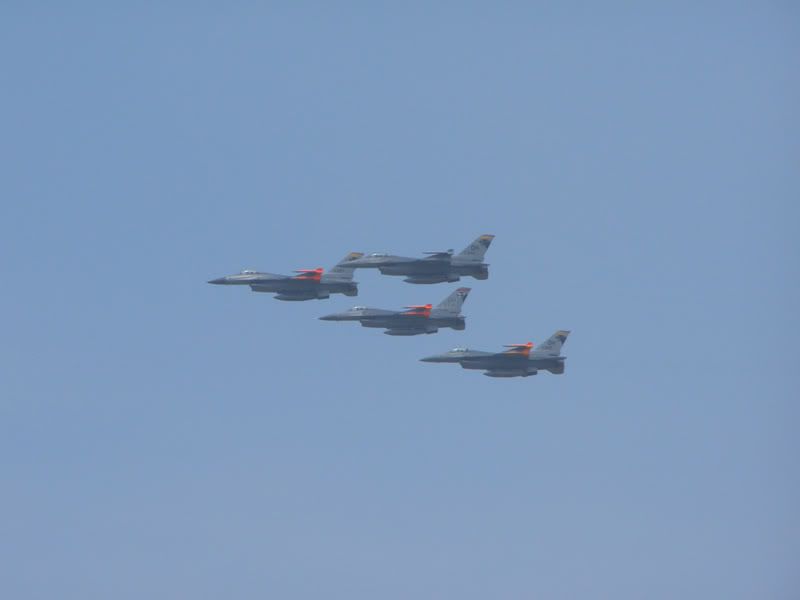
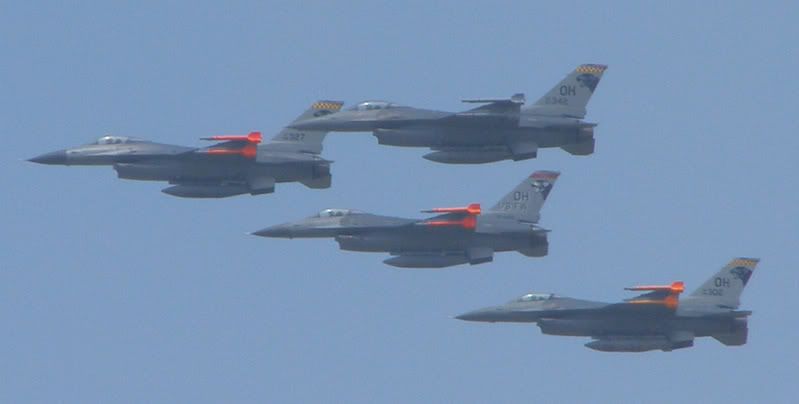
In regards to zooming out and then cropping. Here is a shot of 4 F-16s the flew over by surprise. I was about as far away from the flight line as possible and just put my camera up and see what it would do. The first is the origional photo. The next one is it cropped. There is noise, but I was amazed how clean the lines were for "shooting from the hip." I think I had this photo on my desktop for a bit, but a tad smaller and I was pretty happy with it actually. I was wondering how the lines were so defined from this distance, but blurred when I was on the crowd line. :?

Image

Image


Top
 Profile  
 
 Post subject:
PostPosted: Wed Apr 04, 2007 11:36 pm 
Offline
1000+ Posts!
1000+ Posts!
User avatar

Joined: Sun Dec 03, 2006 7:43 pm
Posts: 1454
Location: Colorado
Quote:
Just curious, but how did you know the settings, the fact that I had a 10x zoom, and the fact that it was an Olympus?


There is something called Exif (Exchangeable image file format) tags that which is metadata embedded in every Exif image which are JPEGs and other files. The Exif tags stay with the image even when edited, copied etc. When you have the file you can right click on it and select "Properties," click on the "Summary" tab. You may have to click the "Advanced" button to see the properties but once you do it will show you all of the info about the pic such as shutter speed, f-stop, resolution, camera model, ISO etc.

There are a couple of things about telephoto lens converters. Number one is quality is poor on many many of the cheaper teleconverters, Unfortunatly with camera glass most of the time what you pay for is what you get. Nice lenses often cost many hundreds and even thousands of dollars. Same thing with the filters. Get quality filters. A good value is something like Hoya filters which tend to be affordable but also good quality. Remember, no matter how great your cameras lens is, if you put a low quality piece of glass at the end of it then it will look low quality. Also, make sure your lens, teleconverter, filter are clean, clean, clean. Remember both ends of the teleconverter and filter need to be clean. Some oil from a finger print or even humidity built up between the lenses will make for a poor picture.

Make sure you dust off your lens with can of air or a clean, fine make-up brush before you wipe it down because one grain of sand will kill your lens if you rub it. Then get cleaning solution that is made for multi-coated lenses, you don't want to kill the coating on your lens, also use a lens cleaning tissue to clean, and some like to polish by a very clean micro fiber cloth. You want to check and clean as needed your lens on every outing, they can get very dirty and you would be surprised how many never clean the lens.

Also, another thing, when you are cleaning your lens of your camera, make sure to hold onto the side of the lens "the part that extends for zoom and focus." When you are cleaning your glass you don't want to exert in and out pressure on the lens because this can damage the focus motors which are very small and precise.

Ryan


Top
 Profile  
 
 Post subject:
PostPosted: Wed Apr 04, 2007 11:57 pm 
Offline
1000+ Posts!
1000+ Posts!
User avatar

Joined: Sun Dec 03, 2006 7:43 pm
Posts: 1454
Location: Colorado
Quote:
I was wondering how the lines were so defined from this distance, but blurred when I was on the crowd line.


Just guessing I think maybe that being farther away that you didn't have to pan as fast to keep up with the aircraft which made for a more steady hand. Also. noticed the f stop was 5.6 which is getting more out of the purple fringe danger zone. Don't see much if any purple fringing on that photo. Also, narrowing the aperture in general sharpens your image. Maybe just a combination of a lot of things.


Top
 Profile  
 
 Post subject:
PostPosted: Sat Jun 23, 2007 9:59 pm 
Offline
User avatar

Joined: Wed Oct 04, 2006 6:42 pm
Posts: 627
Location: Akron, Ohio
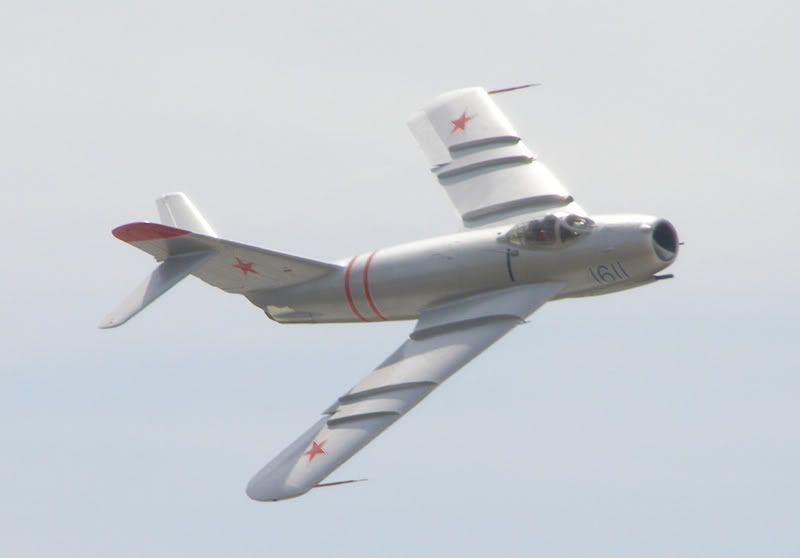
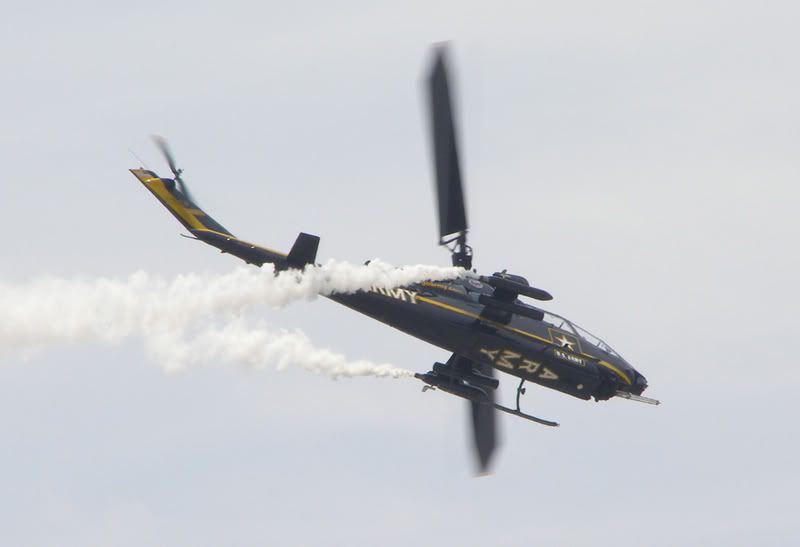
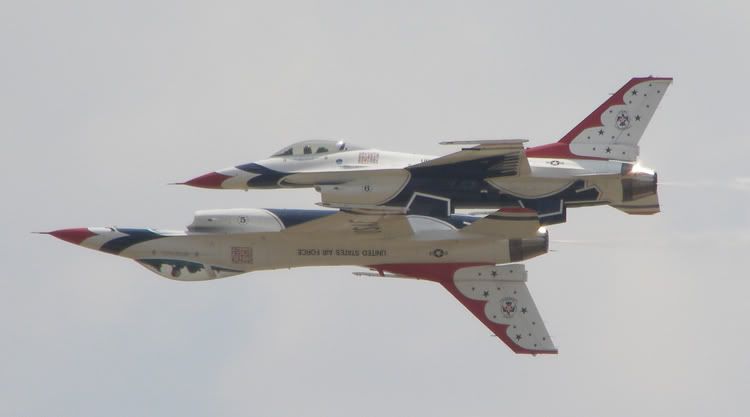
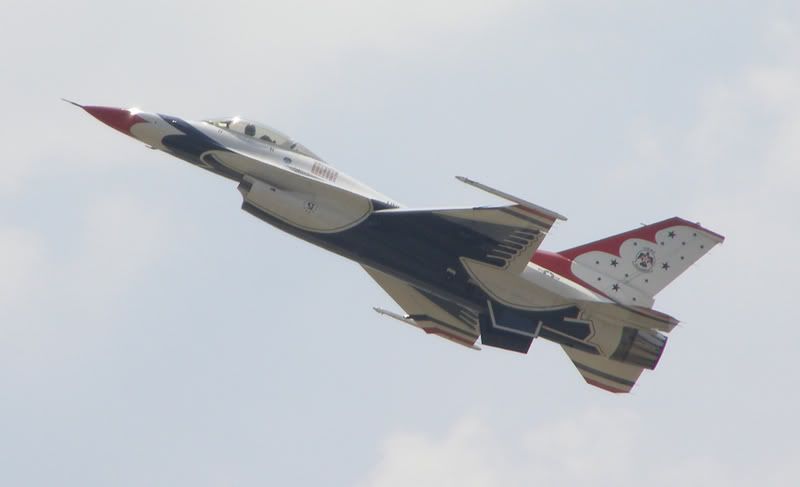
I would like to thank everyone who gave me suggestions for better photos. I went to the Wings Over Pittsburgh air show and tried out some of the settings and I could already tell a difference! I also used an UV lense and that helped as well. (Most of the shots were pointed up into the sun)

One thing I found that helped practicing with the settings was taking pictures of the guard rails next to the road. While in the passenger seat (no I was not driving and taking photos) I would take pics of all the posts that we were going by at 70 mph and that was good practice for the aircraft.

Here are a few pics from the show... any comments are appreciated! :D

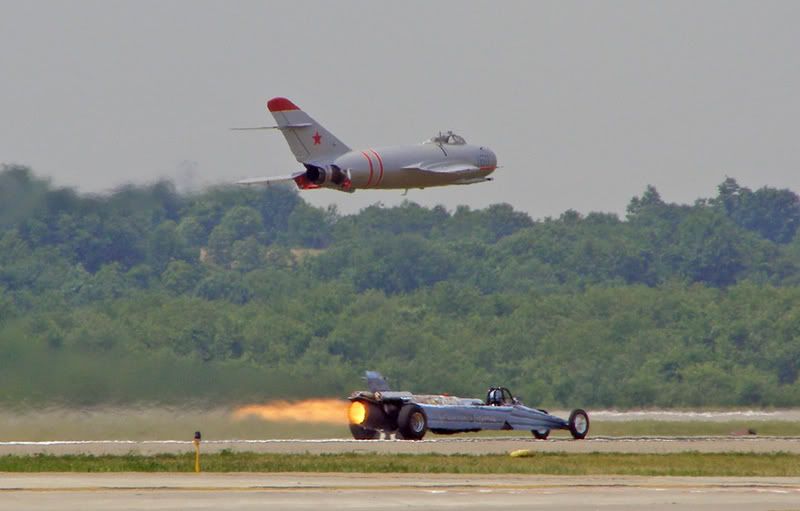
-I think the MiG-17 could have been a little sharper, but some guy got in the way and I had to move and didn't have time to get really set.

-I was experimenting the settings to get the blur of the blades of the Sky Soldiers

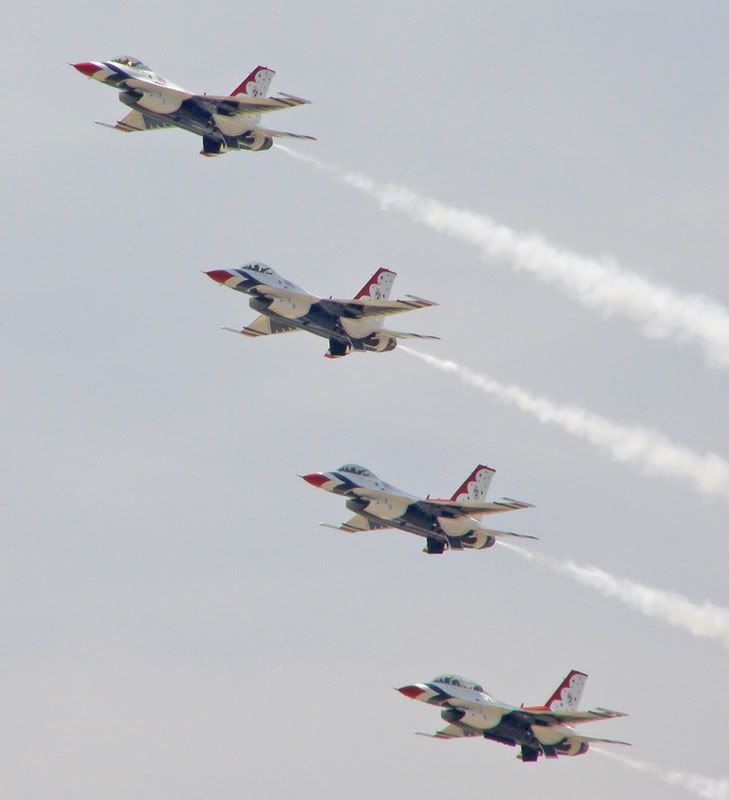
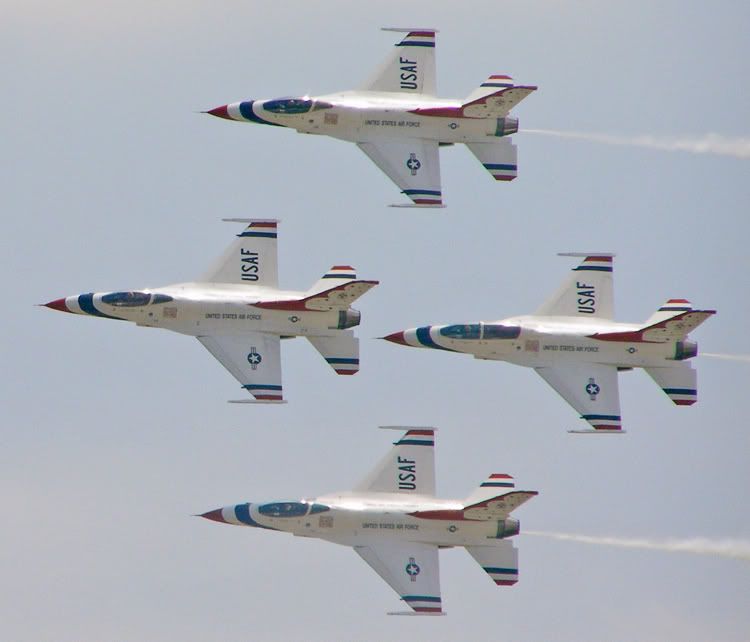
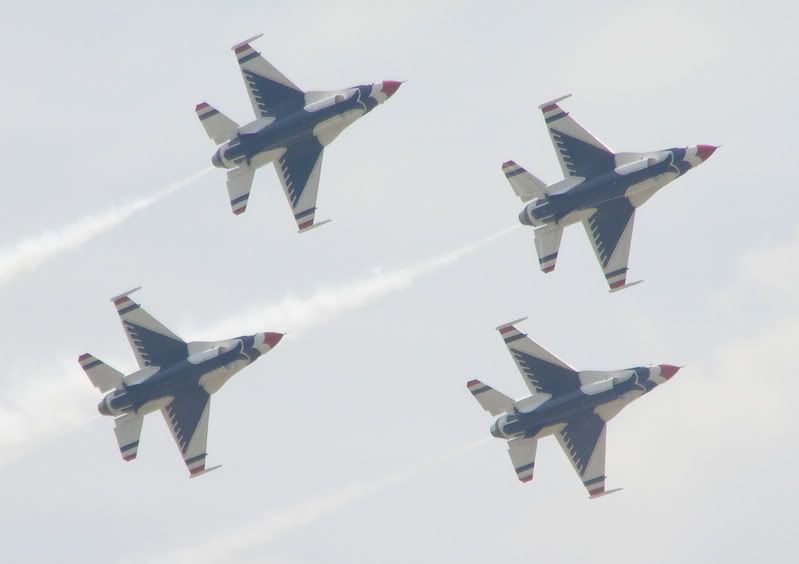
-For the most part, I am pretty happy with the Thunderbirds shots. Like I said before, I understand I am a college student and can't have a camera the size of my car right now. So at this point in time, if I could get all my pics to look like the Thunderbird shots, I'd be pretty happy!

Image

Image

Image

Image

Image

Image

Image

Image


Top
 Profile  
 
 Post subject:
PostPosted: Mon Jun 25, 2007 11:15 pm 
Offline
User avatar

Joined: Mon Mar 26, 2007 4:07 pm
Posts: 623
Location: Moorpark, CA
Looks good! 8)


Top
 Profile  
 
Display posts from previous:  Sort by  
Post new topic Reply to topic  [ 14 posts ] 

All times are UTC - 5 hours


Who is online

Users browsing this forum: Google [Bot], Google Adsense [Bot] and 212 guests


You cannot post new topics in this forum
You cannot reply to topics in this forum
You cannot edit your posts in this forum
You cannot delete your posts in this forum
You cannot post attachments in this forum

Search for:
Jump to:  
Powered by phpBB® Forum Software © phpBB Group